
Skip to content
the gingerbread house blog
Menu
  • Home
  • About
    • About Me
    • Brand Ambassador
      • Adobe Photoshop Elements 2018
      • ASK Italian
      • Aquabeaders
      • Bahlsen Book Club
      • Bandai STEM Ambassador
      • Baker Ross Blogger Network
      • Blogger Board Game Club
      • Bostik Family Craft Bloggers Network
      • Build Your Own Brand Ambassador
      • Britax Mumbassador
      • Dunelm Mill Blogger
      • Friends of Sylvanian Families
      • Happy By Nature
      • Hasbro Toy Tribe
      • KDUK Mumbassadors
      • Lindam Munchkin blogger panel
      • Maped Helix Blogger Ambassador
      • Miffy Mums
      • Morphy Richards Innovator
      • Netflix Stream Team
      • Peppa Pig Holiday Blogger
      • Pinty Plus Ambassador
      • Playmobil Playologist
      • Quinny Caster
      • Sizzix
      • Staedtler Try It Tribe
      • Stamptastic Ambassador
      • Toys R Us Toyologist
      • Twinkl Blogger
      • UKMums.TV Preferred Blogger
    • 50 before 50 bucket list
    • Mailing list
    • Privacy Policy
  • Crafts
    • Crafts for Kids
      • Advent crafts
      • After school crafts
      • Apple Day crafts
      • April Fools’ Day
      • Back to school crafts
      • Bonfire Night crafts
      • Children In Need
      • Chinese New Year crafts
      • Christmas
      • Crochet
      • Dr Seuss Day craft
      • Duck Tape crafts
      • Earth Day crafts
      • Easter
      • Elf on the Shelf
      • Elmer Day
      • Fairy garden crafts
      • Fathers Day
      • Food crafts
      • Fourth of July crafts
      • Free printables
      • Garden crafts
      • Gingerbread
      • Gingerbread houses
      • Grinchmas crafts
      • Halloween
      • Handmade gifts
      • International Women’s Day
      • Kids crafts
      • London crafts
      • Lego crafts
      • May Day crafts
      • Minecraft crafts
      • Mother’s Day crafts
      • Nature crafts
      • New Year crafts
      • Painted rocks
      • Pancake Day crafts
      • Pokemon Day crafts
      • Recycled crafts
      • Roald Dahl crafts
      • Royal crafts
      • Sports crafts
      • Star Wars crafts
      • STEM activity
      • St George’s Day crafts
      • St Patrick’s Day crafts
      • Thanksgiving crafts
      • Toilet roll crafts
      • Tutorials
      • United Kingdom crafts
      • Upcycled crafts
      • Valentines Day crafts
      • Wizarding World crafts
      • World Bee Day
      • World Book Day ideas
      • World Otter Day
    • Crafts for Adults
      • Baking
      • Bento inspiration
      • Craft book reviews
      • Cricut Maker
      • Die cutting crafts
      • List of National Days and Awareness Days in the UK
      • Mollie Makes crafts
      • Paper cut art
      • Patchwork & Quilting
      • Pinty Plus projects
      • Sewing projects
      • Subscription box reviews
  • Family life
    • Charity shopping finds
    • Days out with the kids
      • Sculpture trails
    • Gift guides
    • Parenting tales
      • Siblings
    • What I’m reading
  • Travel
    • days out
    • Bedfordshire
    • Berkshire
    • Buckinghamshire
    • Cornwall
    • Devon
    • Dorset
    • East Sussex
    • Essex
    • France
    • Hampshire
    • Hertfordshire
    • Isle of Wight
    • Kent
    • London
      • Camden
      • City of London
      • City of Westminster
      • Harrow
      • Hillingdon
        • Ruislip
      • London Borough of Bexley
      • Haringey
      • London Borough of Kensington & Chelsea
      • London Borough of Richmond upon Thames
      • London Borough of Southwark
      • London Borough of Wandsworth
      • London Borough of Westminster
      • Southwark
      • Tower Hamlets
      • Wandsworth
    • Norfolk
    • Suffolk
    • Surrey
    • the Netherlands
    • Warwickshire
    • West Sussex
    • Wiltshire
    • National Trust
    • Sculpture trails
    • Local Review
Menu
Creating Silhouette Wall Art with Photoshop Elements 2018

Creating Silhouette Wall Art with Photoshop Elements 2018

Posted on October 12, 2017September 4, 2022 by jenny

Today I’m so excited to share a really fun tutorial for creating Silhouette Wall Art using some of the new Guided Edits in Photoshop Elements 2018. You know how much I love creating my own little DIYs for our home so I’ve been busy updating our gallery wall with personalised pieces of art.

This is a sponsored post on behalf of Adobe Photoshop Elements 2018

I’m going to share our craft for making Silhouette Wall Art. This is a super simple way to update your home decor, a great talking point and a fun way to create your own heirloom art!

Materials needed to create your own Silhouette Wall Art

First you need to gather your supplies:
Photographs of the family
Adobe Photoshop Elements 2018 (which includes the new Replace Backgrounds Guided Edit that we will be using for this craft)
4 x picture frames
Black spray paint
Paper
Laser printer

If you haven’t yet got a copy of Adobe Photoshop 2018 then don’t worry as you can get a free trial of the software for 30 days.

Why Silhouette Wall Art?

My inspiration for this was the gorgeous silhouettes people used to create by hand. We actually have one my mother-in-law created of my husband when he was a little boy. It’s beautiful but I was so excited to let Photoshop Elements 2018 do all the hard work for me, rather than sitting and creating the silhouette by hand like my mother-in-law did 35 years ago.

To frame or not to frame?

I wanted to use four existing vintage frames from our photo gallery wall. These are special to us as we found them bricked up in our old house and I previously wrote about them here (link). However I wanted to update the whole gallery wall so gave them a quick makeover with a spray of black paint. Once I had done this I was able to start work on creating the silhouettes. You may not want to frame your wall art, they would look just as effective hung on the wall with washi tape.
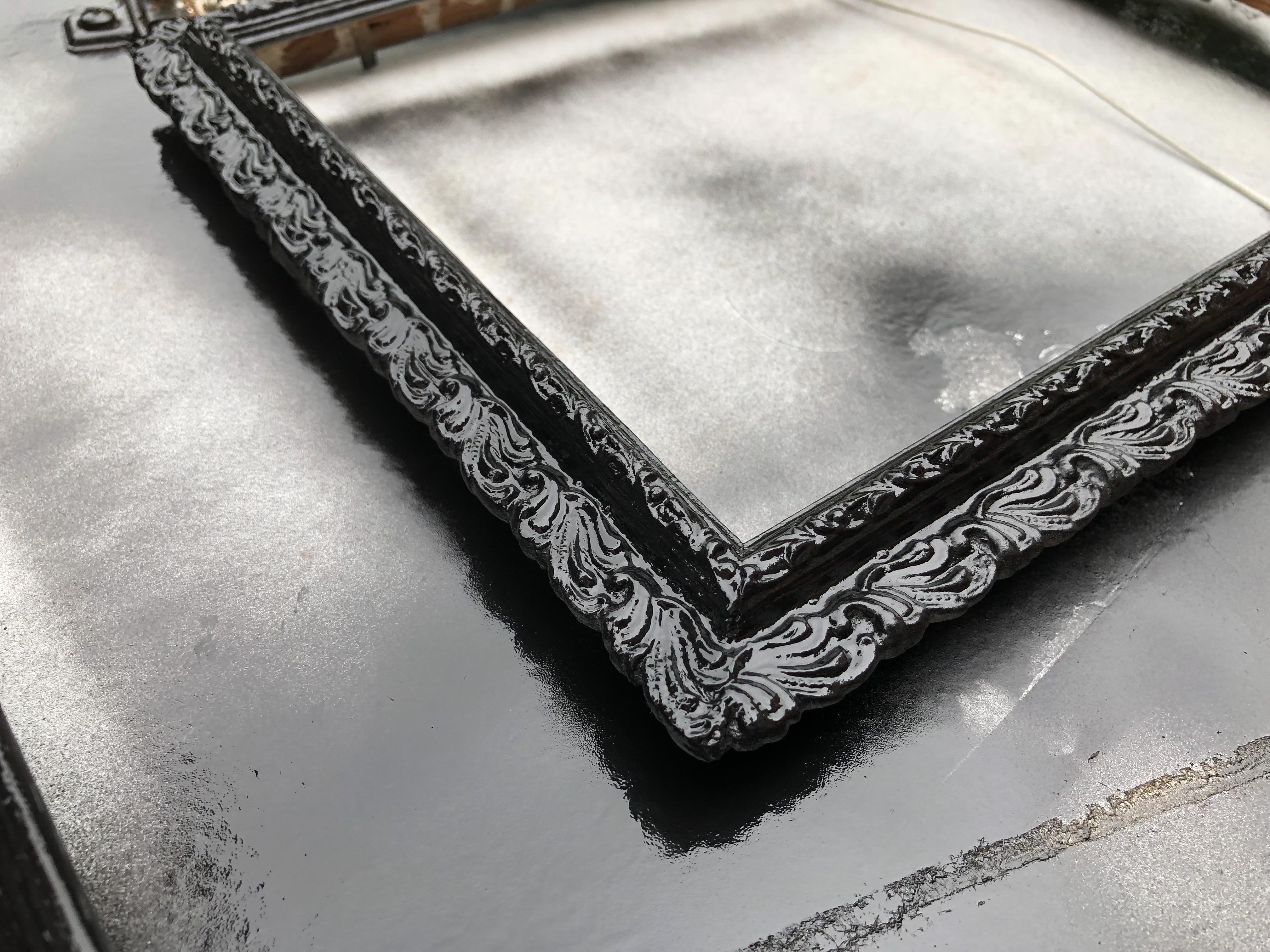
updating vintage frames with spray paint

How to create Silhouette Wall Art using Photoshop Elements 2018

The first step was to take photographs of the family. I found a blank wall without any colourful wallpaper and photographed everyone against it, all looking the same way. Then I exported the photographs to my computer and opened up Photoshop Elements 2018 to get started.

I used one of the special Guided Edits in Photoshop Elements 2018 which made this a really fun and easy craft. Using the Guided Edits is a brilliant way to edit your photos and use them in a variety of ways. To create the Silhouette Wall Art I used the Replace Background Guided Edit to create simple silhouettes based on my family photos.
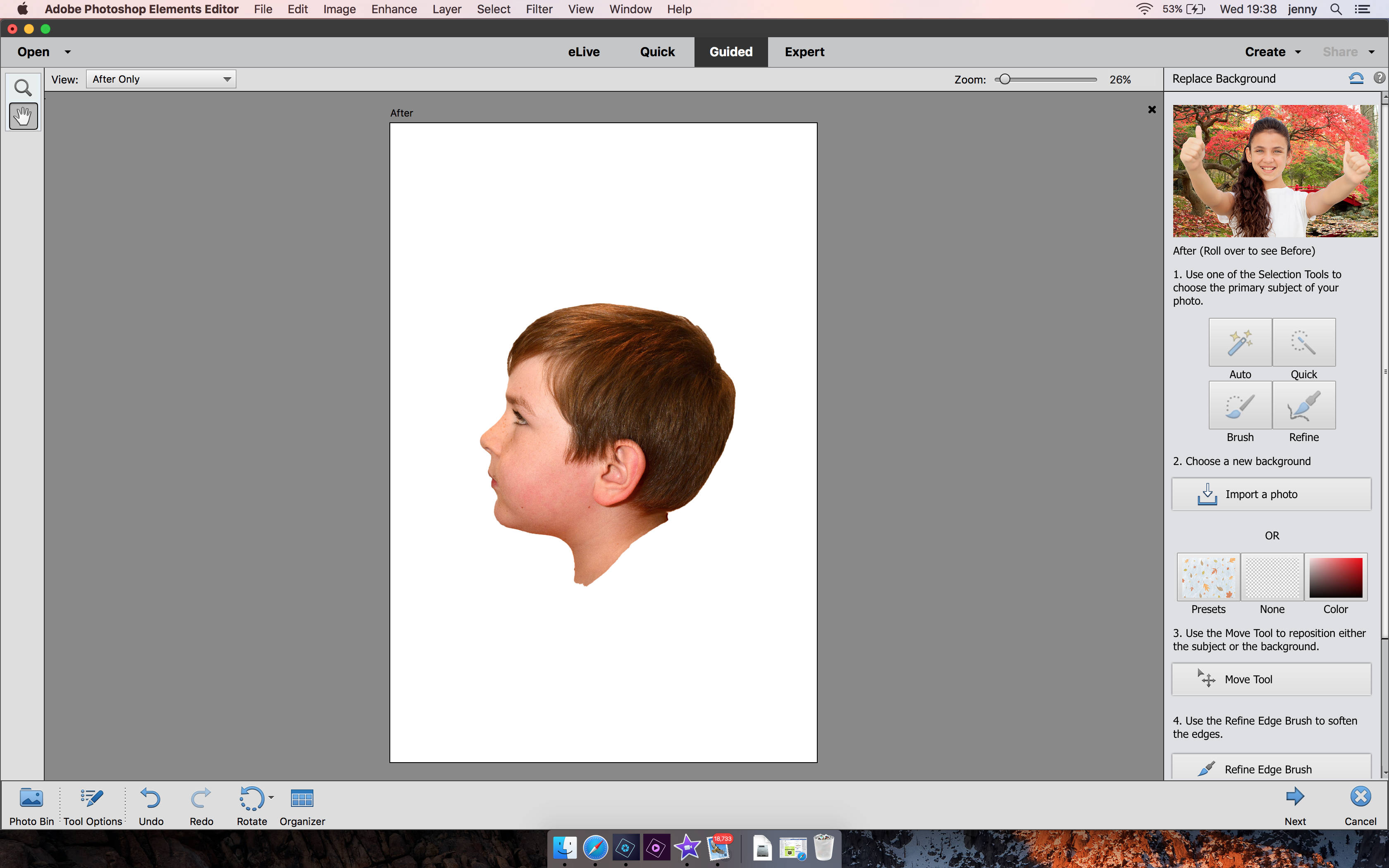
Adobe Photoshop 2018 Replace Background Guided Edit

I have created a step by step video to explain exactly how I created the silhouette wall art using the photo editing software which you can watch below.

Once I had printed all four images I was able to cut them to the size of each frame by drawing around the backing boards, and cutting round them using a self healing mat and scalpel.

framing silhouette wall art

Then I was able to place each picture inside the frames. What do you think? I’m so pleased with them and can’t believe how straightforward they were to create. I love the fact that we face each other and they are going to look brilliant hanging on our updated gallery wall.
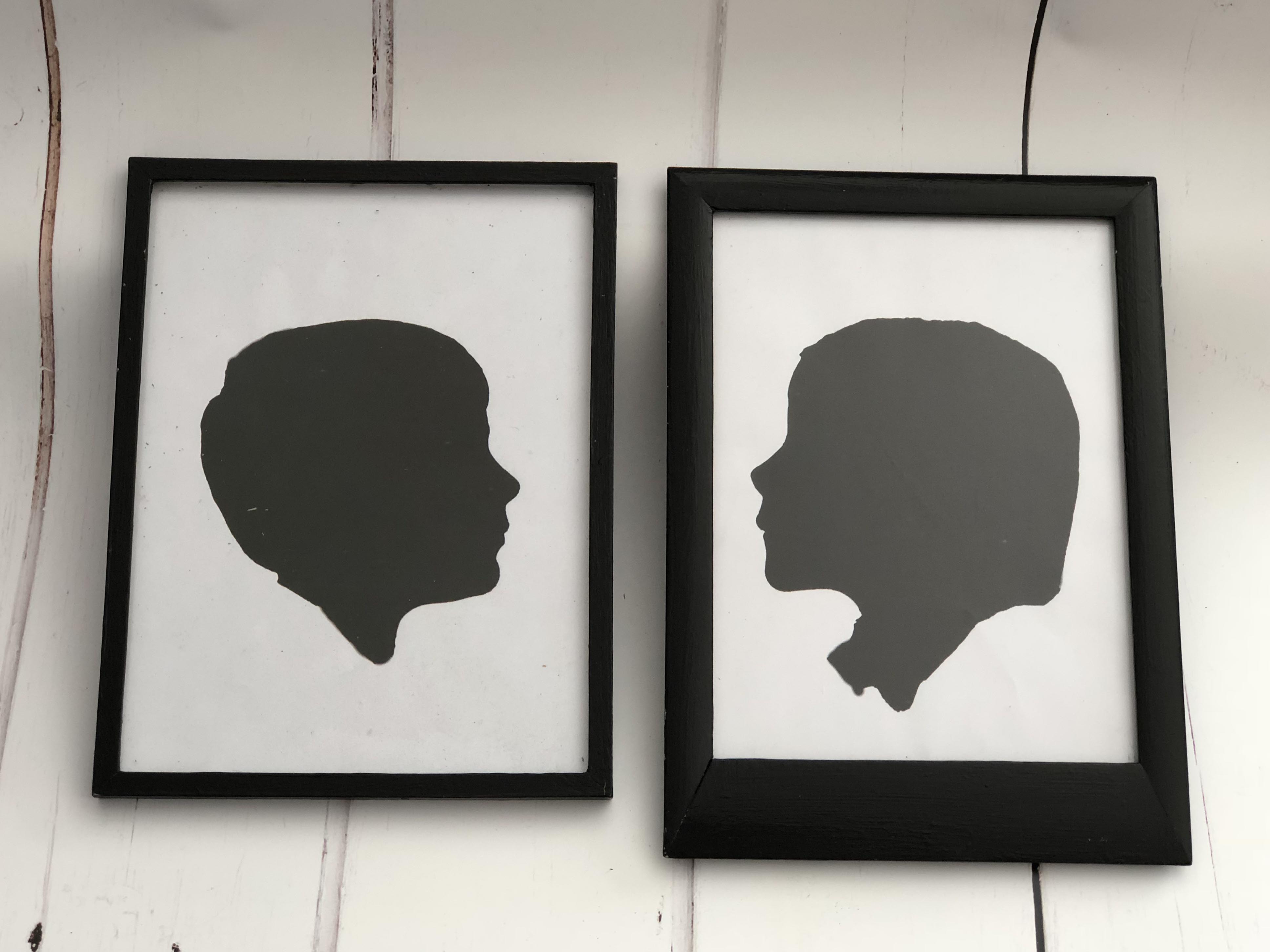
how to create silhouette wall art

Pin for later: Creating Silhouette Wall Art with Photoshop Elements 2018

Creating Silhouette Wall Art with Adobe PHOTOSHOP Elements 2018

Related Posts:

  • Creating a Family Financial Plan That Works
    scott-graham-5fNmWej4tAA-unsplash
  • Creating Colourful Flower Gifts for Christmas and Easter
    photo-1562224780-ba39856ecadd
  • Creating a Cosy Home: Essentials for Comfort and Style
    catherina-schurmann-W9bl6mfs61c-unsplash
Category: Adobe Partner, crafts

13 thoughts on “Creating Silhouette Wall Art with Photoshop Elements 2018”

  1. aunty caca says:
    October 12, 2017 at 9:51 am

    they look great!!! xx

    Reply
  2. Jo says:
    October 12, 2017 at 10:28 am

    Wow! This is so clever. I want to do it. I must get Photoshop elements

    Reply
  3. Sarahjane Wood says:
    October 12, 2017 at 4:37 pm

    Wow these look super cool and classic! What a perfect way to capture your family. I might have to try this out with a picture of my cat!

    Reply
  4. Kirsty says:
    October 13, 2017 at 4:09 pm

    Oh wow these look incredible and a great little memory of your children as they grow. I really like the frame as well. Might have to look into the photoshop elements now.

    Reply
  5. Kaz | Ickle Pickles Life and Travels says:
    October 13, 2017 at 8:32 pm

    I do love silhouette pictures – what a great idea to make your own! Kaz

    Reply
  6. Lauretta at Home and Horizon says:
    October 14, 2017 at 2:48 am

    This looks interesting and fun! I want to try this with my tweens.

    Reply
  7. Nichola - Globalmouse says:
    October 14, 2017 at 10:54 pm

    Oh what a great thing to do, I had no idea how to do it myself, or even that this was possible, so this is wonderful.

    Reply
  8. Naomi says:
    October 16, 2017 at 9:29 pm

    Ooooh I’m going to have a crack at this tomorrow! Thanks for sharing!

    Reply
  9. Victoria Marden says:
    October 16, 2017 at 9:45 pm

    These are so cool, especially as they change so quickly.

    Reply
  10. Jacqui Paterson says:
    October 18, 2017 at 1:43 pm

    Awww, this is so cute – agreat Xmas gift idea for grandparents too! x

    Reply
  11. Pingback: Personalised Christmas Letter Bunting {using Photoshop Elements 2018} - the-gingerbread-house.co.uk
  12. Pingback: Why you should create a New Year’s Time Capsule with your kids - the-gingerbread-house.co.uk
  13. Pingback: A Spring Refresh Q&A - the-gingerbread-house.co.uk

Leave a Reply Cancel reply

Your email address will not be published. Required fields are marked *

Welcome to the gingerbread house blog. I’m Jenny, London mum of two teens. Craft and family lifestyle blogger, occasional baker of gingerbread. Find out more about us, our latest crafts, and be inspired by our days out. Contact me jenny@the-gingerbread-house.co.uk

Search

Latest posts

  • The Weekly Edit {Week 24/2026} June 15, 2026
  • Tobio’s vs. Emily Lex: The Definitive Watercolor Guide June 14, 2026
  • Air-Dry Masterpieces by Hazel Brady {book review} June 13, 2026
  • Best UK Websites to Sell Cookbooks, Craft Books and Specialist Titles June 12, 2026

2005-2026

Subscribe to our mailing list

* indicates required

Popular posts

As an Amazon Associate I earn from qualifying purchases.

All content strictly copyright Jenny 2005-2026

2026 Reading Challenge

2026 Reading Challenge
Jenny has read 0 books toward her goal of 24 books.
hide
0 of 24 (0%)
view books

We hope that you enjoy using our free printables. Please note these printables are for personal use only. Not for redistribution. All images are copyrighted.

© 2026 the-gingerbread-house.co.uk | Powered by Minimalist Blog WordPress Theme